Sale!
DIAGNOSTIC SOFTWARE Wabco

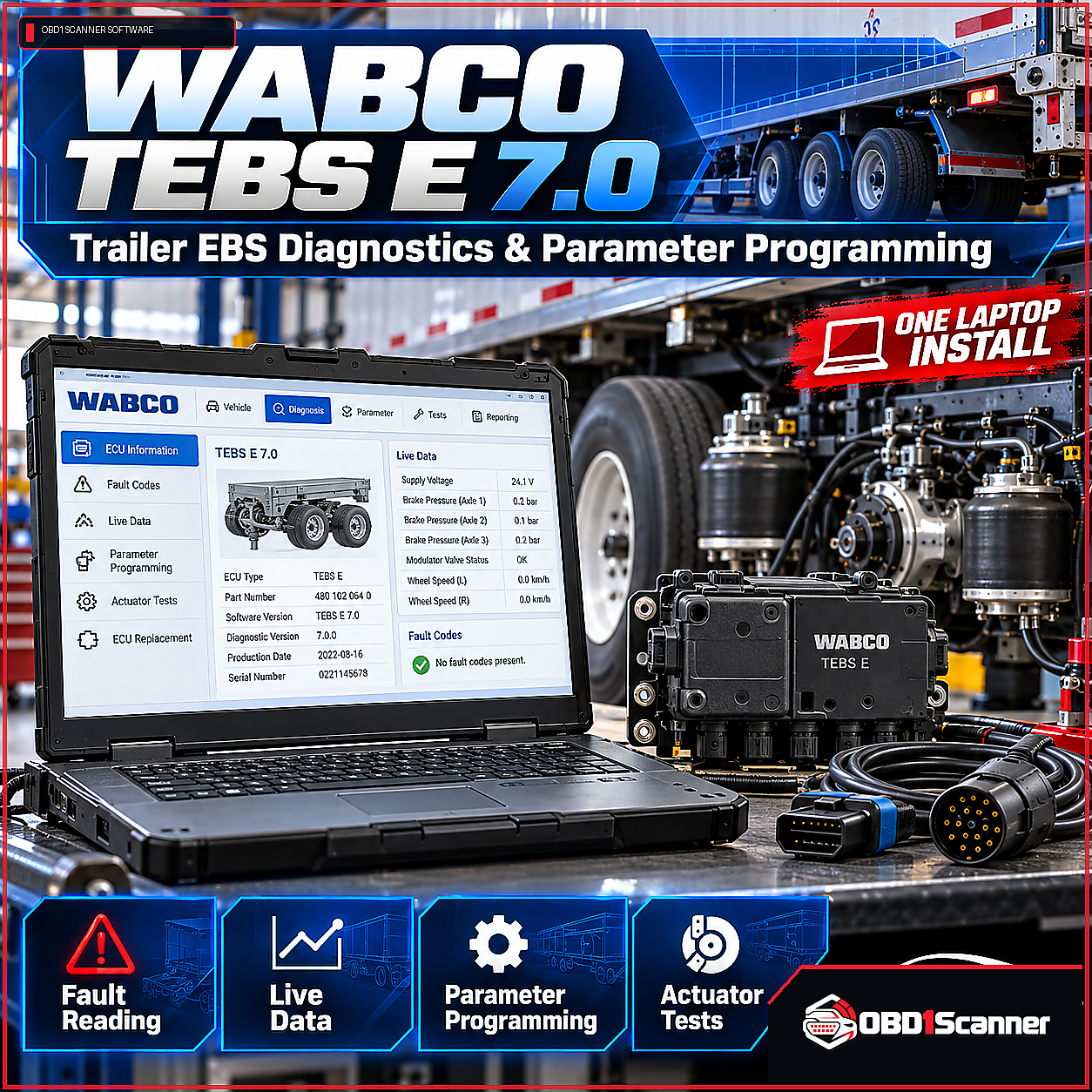
WABCO TEBS E 7.0 Diagnostic Software – Trailer EBS Diagnostics & Parameter Programming (One Laptop Install)

Original price was: $149.99.Current price is: $88.88.

WABCO TEBS E 7.0 Diagnostic Software provides diagnostic and configuration functions for trailer EBS systems, including fault-code handling, live measurements, parameter programming and actuator tests. This One Laptop Install includes remote installation and activation support.

WabcoVersion: WABCO TEBS E 7.0 Diagnostic Software
Remote Installation

This software requires remote installation. After payment, the support team will contact you to confirm compatibility and arrange the installation session.

Need compatibility help? Contact Support →
Choose your purchase option
Secure checkout
Buy Now

Add to Cart to keep shopping, or Buy Now to go directly to checkout.

ORDER TYPEDigital software

Delivery or installation details are shown for the individual product.

COMPATIBILITYCheck before purchase

Review technical requirements and supported applications carefully.

SUPPORTProduct guidance

Contact support when you need help interpreting compatibility information.

VERIFIED PRODUCT INFORMATION

Technical Details & Compatibility

Review the software version, system requirements and compatibility information before purchase.

Software Version
WABCO TEBS E 7.0 Diagnostic Software
Supported Operating Systems
Operating System: Windows 10 (64-bit) or Windows 11 (64-bit)
System Requirements
Minimum requirements Operating System: Windows 10 (64-bit) or Windows 11 (64-bit) Processor: Intel Core i3 or equivalent Memory (RAM): 4 GB minimum Storage: 1 GB free disk space USB port for adapter connection Administrator rights for software installation Recommended for professional use Processor: Intel Core i5 or i7, or equivalent Memory (RAM): 8 GB or more Storage: 2 GB free disk space Stable internet connection for activation, updates, and remote support Compatible diagnostic adapter (see adapter compatibility below)
Supported Vehicles / Equipment
Typical manufacturers and sectors covered include: Schmitz Cargobull Krone Schwarzmüller VBG BPW SAF-Holland Wielton China and European trailer OEMs that fit WABCO EBS Mixed fleet trailers with retrofit WABCO ECUs
Supported Functions
Fault code reading and clearing for trailer EBS ECUs and associated sensors. Parameter programming for vehicle identification, axle group setup, wheel sensors, and braking logic. Live measurements including wheel speed, axle load, sensor voltages, and brake pressure readings. ECU configuration for trailer types, ABS/ADB modes, valve mapping, and ECU options. Actuator and valve tests to confirm physical operation and response times. Service procedures such as wear sensor checks, sensor replacement routines, and initial calibrations. Logging and reporting to export session logs for maintenance records and warranty claims. ECU cloning and module replacement workflows to transfer parameter sets to replacement units.
Required Interface / Adapter
The WABCO TEBS E 7.0 software works with many RP1210-compliant adapters and manufacturer recommended interfaces. Which adapter do I need? Use an RP1210-compliant adapter or a WABCO recommended interface.
License Information
Licensed WABCO TEBS E 7.0 software installed on one laptop Complete activation with the license code.
Storage Requirements
Storage: 1 GB free disk space Storage: 2 GB free disk space
Internet Requirements
Stable internet connection for activation, updates, and remote support Internet access is required for updates and remote support.
Update Policy
Internet access is required for updates and remote support.
Installation Limit
One Laptop Install Licensed WABCO TEBS E 7.0 software installed on one laptop
Compatibility Notes
If you operate less common or highly customized trailers, we recommend checking compatibility with our support team prior to purchase. If your trailer uses a different supplier or a highly customized system, contact support to confirm compatibility. Note that wireless adapters may be supported in some configurations but wired adapters are recommended during initial programming and calibration to avoid interruptions.

Description

WABCO TEBS E 7.0 Diagnostic Software is designed for diagnostics and configuration of trailers fitted with WABCO ECUs and EBS systems. It provides access to fault information, system measurements, parameter settings and service procedures.

Diagnostic functions

  • Read and clear fault codes for trailer EBS ECUs and associated sensors.
  • Program vehicle identification, axle group, wheel sensor and braking logic parameters.
  • View measurements including wheel speed, axle load, sensor voltages and brake pressure.
  • Configure trailer types, ABS/ADB modes, valve mapping and ECU options.
  • Run actuator and valve tests, and perform wear sensor checks, sensor replacement routines and initial calibrations.
  • Export session logs and use ECU cloning and module replacement workflows to transfer parameter sets.

Equipment and interface

Typical equipment coverage includes Schmitz Cargobull, Krone, Schwarzmüller, VBG, BPW, SAF-Holland and Wielton, as well as China and European trailer OEMs that fit WABCO EBS and mixed-fleet trailers with retrofit WABCO ECUs.

Use an RP1210-compliant adapter or a WABCO-recommended interface. Wireless adapters may be supported in some configurations; wired adapters are recommended during initial programming and calibration to reduce interruptions. Check compatibility with support before purchase if your trailer is less common, highly customized or uses a different supplier.

Install and system requirements

This One Laptop Install is licensed for installation on one laptop and includes activation with a license code and remote installation support. Supported operating systems are Windows 10 (64-bit) and Windows 11 (64-bit).

  • Minimum: Intel Core i3 or equivalent, 4 GB RAM, 1 GB free disk space, a USB port and administrator rights.
  • Recommended for professional use: Intel Core i5 or i7, or equivalent, 8 GB RAM or more, and 2 GB free disk space.
  • A stable internet connection is required for activation, updates and remote support.

Reviews

There are no reviews yet.

Be the first to review “WABCO TEBS E 7.0 Diagnostic Software – Trailer EBS Diagnostics & Parameter Programming (One Laptop Install)”

Your email address will not be published. Required fields are marked *

OBD1SCANNER PRODUCT OVERVIEW

Why This Software Stands Out

A focused diagnostic option for trailer EBS service, with fault-code tools, live measurements, parameter programming and ECU replacement workflows in one package.

Pros

  • Includes fault-code reading and clearing, live measurements and parameter programming.
  • Provides actuator tests, service routines and ECU replacement workflows.
  • Supports many RP1210-compliant adapters and WABCO-recommended interfaces.
  • One Laptop Install with remote installation and activation support.

Considerations

  • Installation is limited to one laptop.
  • A compatible diagnostic adapter is required.
  • A stable internet connection is required for activation, updates and remote support.
  • Compatibility should be checked for less common or highly customized trailers.
COMMON QUESTIONS

Software FAQs

Which operating systems are supported?

Windows 10 (64-bit) and Windows 11 (64-bit).

How many laptops can have the software installed?

The One Laptop Install is licensed for installation on one laptop, with activation using a license code.

Which diagnostic adapter do I need?

Use an RP1210-compliant adapter or a WABCO-recommended interface. Wired adapters are recommended during initial programming and calibration.

Is an internet connection required?

A stable internet connection is required for activation, updates and remote support.

Will it work with a less common or customized trailer?

Check compatibility with support before purchase if your trailer is less common, highly customized or uses a different supplier.