Sale!
DIAGNOSTIC SOFTWARE Caterpillar

Cat ET 2025 | Advanced Caterpillar Diagnostic Software (One Laptop Install)

Original price was: $129.99.Current price is: $78.88.

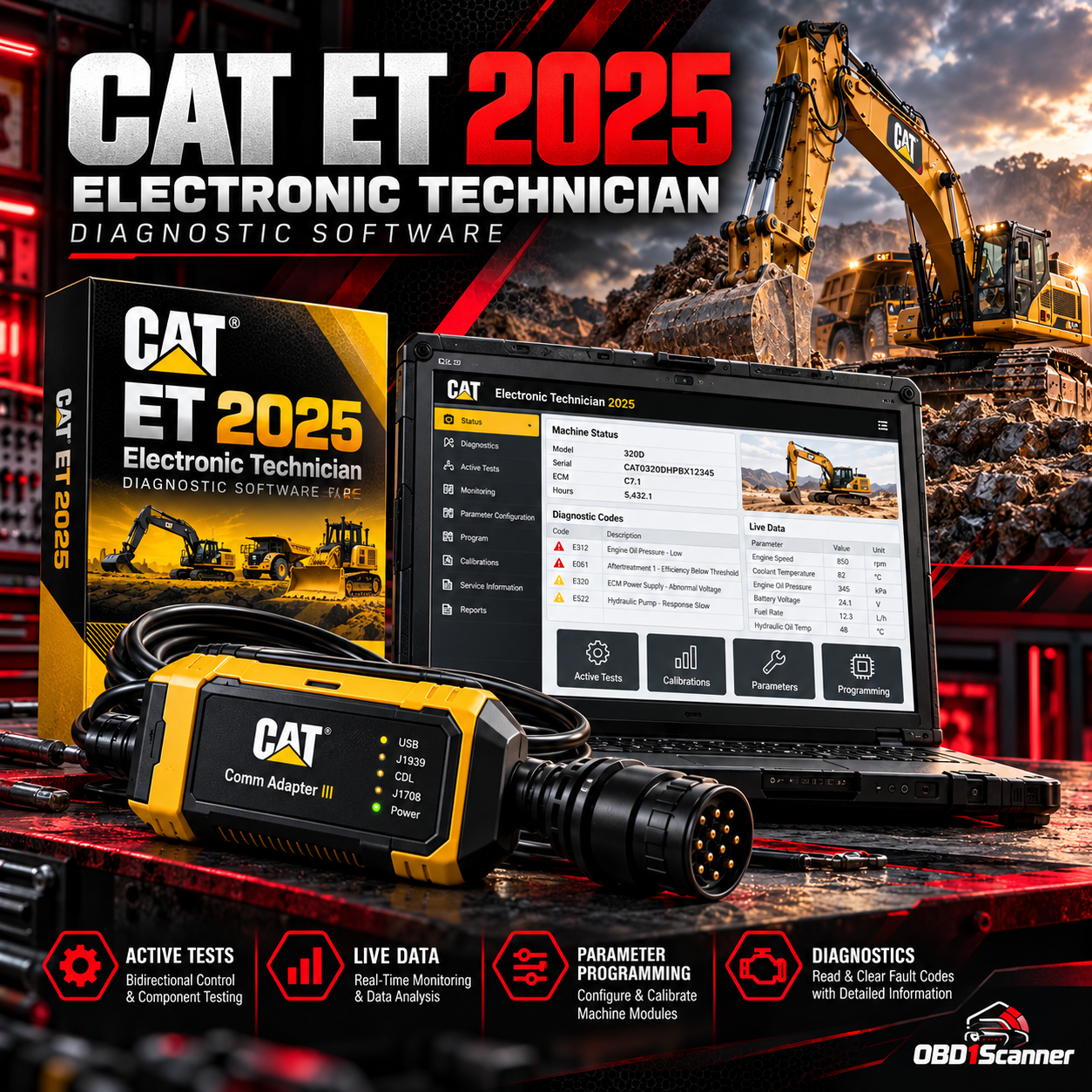
Cat ET 2025 provides diagnostic, testing, and monitoring functions for supported Caterpillar equipment. The package includes a lifetime license for one PC, activated during a remote installation session; a CAT-compatible diagnostic adapter is required.

CaterpillarVersion: Cat ET 2025
Digital / Email Delivery

This software is delivered digitally. Delivery instructions and any required installation information are provided after the order is confirmed.

Need compatibility help? Contact Support →
Choose your purchase option
Secure checkout
Buy Now

Add to Cart to keep shopping, or Buy Now to go directly to checkout.

ORDER TYPEDigital software

Delivery or installation details are shown for the individual product.

COMPATIBILITYCheck before purchase

Review technical requirements and supported applications carefully.

SUPPORTProduct guidance

Contact support when you need help interpreting compatibility information.

VERIFIED PRODUCT INFORMATION

Technical Details & Compatibility

Review the software version, system requirements and compatibility information before purchase.

Software Version
Cat ET 2025
Supported Operating Systems
Minimum Operating System: Windows 10 (64-bit) Recommended Operating System: Windows 11 (64-bit)
System Requirements
Processor: Intel Core i5 or equivalent RAM: 8 GB minimum Processor: Intel Core i5 or better RAM: 16 GB for improved performance
Supported Vehicles / Equipment
Excavators and backhoes Wheel and track loaders Bulldozers and graders Articulated and off-highway trucks Generators and power units Marine and industrial engines
Supported Functions
Complete diagnostics: Read, interpret, and clear active and logged fault codes. Active tests: Run actuator and sensor tests for fast troubleshooting. Parameter programming: Configure system parameters and perform ECU programming where supported. Real-time monitoring: View live engine and machine data and record sessions for analysis. Advanced troubleshooting: Step-by-step guided tests and fault isolation procedures. Report export: Save and print diagnostic reports for customers and service records.
Required Interface / Adapter
Interface: CAT-compatible diagnostic adapter (e.g., CAT Comm Adapter III) Interface: CAT Comm Adapter III or equivalent
License Information
Lifetime license — one-time installation for a single PC Lifetime license will be activated on the designated PC during the remote session performed by our engineer.
Storage Requirements
Disk Space: 50 GB free (full version) Disk Space: 50 GB or more
Internet Requirements
Internet access is required for the remote installation appointment.
Installation Limit
This Cat ET 2025 package includes a Lifetime License that is applied to one PC only. The lifetime license included in this package is applied as a one-time installation on a single PC during the remote session.
Compatibility Notes
Turn off antivirus before starting installation; some antivirus programs may flag activation files as false positives. Ensure you have the required CAT-compatible adapter (CAT Comm Adapter III recommended) available at the time of remote installation.

Description

Cat ET 2025 provides diagnostic and troubleshooting functions for supported Caterpillar equipment. Read, interpret, and clear active and logged fault codes; run actuator and sensor tests; view and record live data; and save or print diagnostic reports.

Diagnostic functions

  • Read, interpret, and clear active and logged fault codes
  • Run actuator and sensor active tests
  • Configure system parameters and perform ECU programming where supported
  • View and record live engine and machine data
  • Use guided tests and fault-isolation procedures
  • Save and print diagnostic reports

Supported equipment

  • Excavators and backhoes
  • Wheel and track loaders
  • Bulldozers and graders
  • Articulated and off-highway trucks
  • Generators and power units
  • Marine and industrial engines

Requirements and installation

  • Operating system: Windows 10 (64-bit) minimum; Windows 11 (64-bit) recommended
  • Processor and memory: Intel Core i5 or equivalent and 8 GB RAM minimum; Intel Core i5 or better and 16 GB RAM recommended for improved performance
  • Storage: 50 GB free or more
  • Adapter: CAT-compatible diagnostic adapter, such as CAT Comm Adapter III or equivalent
  • Internet: Required for the remote installation appointment
  • License: Lifetime license applied as a one-time installation to one PC during a remote session

Turn off antivirus before installation; some programs may flag activation files as false positives. Have the required CAT-compatible adapter available for the remote installation.

Reviews

There are no reviews yet.

Be the first to review “Cat ET 2025 | Advanced Caterpillar Diagnostic Software (One Laptop Install)”

Your email address will not be published. Required fields are marked *

OBD1SCANNER PRODUCT OVERVIEW

Why This Software Stands Out

A practical option for supported Caterpillar equipment, with fault-code diagnostics, active tests, live data recording, and guided troubleshooting. The one-PC license and adapter requirements are clearly stated.

Pros

  • Reads, interprets, and clears active and logged fault codes
  • Includes active tests, live data monitoring, and guided troubleshooting
  • Can save and print diagnostic reports
  • Lifetime license for a one-time installation on one PC

Considerations

  • Requires a CAT-compatible diagnostic adapter
  • Installation is limited to one PC
  • Internet access is required for the remote installation appointment
  • Antivirus may need to be turned off during installation
COMMON QUESTIONS

Software FAQs

What adapter is required?

A CAT-compatible diagnostic adapter is required, such as CAT Comm Adapter III or an equivalent interface.

How many PCs can use the included license?

The lifetime license is applied as a one-time installation to one PC during a remote session.

Which operating systems are supported?

Windows 10 (64-bit) is the minimum operating system. Windows 11 (64-bit) is recommended.

Is internet access required?

Yes. Internet access is required for the remote installation appointment.

What should I know about antivirus software?

Turn off antivirus before installation. Some antivirus programs may flag activation files as false positives.